Use this process to initiate an ad hoc request to the Travel team in Workday to add a Concur delegate for a V2 visitor. V2 visitors are one type of contingent worker in Workday.
| UI Text Box |
|---|
|
The setup process for a new V2 visitor in Workday includes a step where the visit coordinator can identify one or more Concur delegates for the visitor. The ad hoc request process described here is only required to add another delegate for the visitor, beyond those who were originally configured. |
Step-by-Step Guide
- Navigate to Workday and search for "Create Request" in the global search bar.
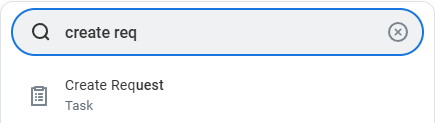
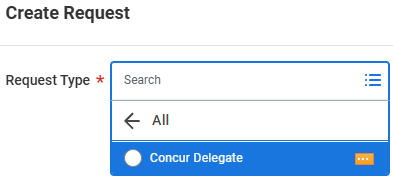
- Select "Concur Delegate" for the Request Type and press OK. You can search for "Concur" or click All > Concur Delegate.
- In the Describe the Request box, enter the delegator's first and last name (e.g., "Delegator: Bugs Bunny").
- In the Who will be the Concur Delegate? box, enter the delegate's first and last name (e.g., "Mikaela Shiffrin").
| UI Text Box |
|---|
| color | light-red |
|---|
| icon | warning |
|---|
|
The Travel team will not know whom the request is for if the name of the delegate is not included. |
View a Screen Recording of these Steps
| Multimedia |
|---|
| name | Workday Ad Hoc Concur Delegate Request.mp4 |
|---|
|
Related articles
| Content by Label |
|---|
| showLabels | false |
|---|
| max | 5 |
|---|
| spaces | EITKBDRAFT |
|---|
| showSpace | false |
|---|
| sort | title |
|---|
| type | page |
|---|
| excludeCurrent | true |
|---|
| cql | label in ("delegates","delegation") and type = "page" and space = "EITKB" |
|---|
| labels | delegates concur Workday |
|---|
|